
Imagine this scenario. An infrastructure engineer upgrades the ECS cluster Terraform module from version 5.11.4 to 5.12.0. Routine change. They run terraform apply, review the plan, approve it. Thirty seconds later, the API service is running code from three weeks ago.
No alert fired. No obvious error. A deployment that shipped this morning, validated in staging, approved by the team, carrying a critical fix, has been quietly undone.
This is version drift. It is silent until it causes an incident, and it is a real risk for any team that manages application deployments separately from infrastructure. The good news is that it is entirely preventable.
This post explains why it occurs and introduces the SSM Registry Pattern, the solution that SMS’ DevOps managed services implemented for Gridline, which is now running in their production environment.
How Teams End Up Here
The split between application repositories and infrastructure repositories is a natural consequence of scale.
When you have one service and one team, keeping everything in one place is manageable. When you have a dozen services, each deployed independently by its own team, and a separate infrastructure practice managing the underlying platform, the split is the right call. Application code and infrastructure code change on different schedules, have different reviewers, and carry different risks. Separating them gives each team the autonomy to move at its own pace.
In this model, application deployments bypass Terraform entirely. When an application team pushes a new container image, their CI pipeline builds it, tags it with the commit SHA, pushes it to ECR, and updates the ECS service directly. For a Lambda function, the pipeline zips the package, uploads it to S3, and updates the function. Terraform is not involved. That is by design. Routine application deployments should not require an infrastructure pull request.
However, the infrastructure repository still references those application versions. The ECS task definition must point to a container image. The Lambda function configuration must reference a deployment package. Before the split, both lived in the same codebase and were updated together. After the split, the infrastructure code holds a reference to a version it no longer controls.
Gridline, a financial technology firm running multiple application repositories alongside a mature infrastructure as code setup built on Terraform, recognized that version drift was creating friction as their infrastructure grew. Their team was doing everything right. They had separate repos for application code and infrastructure, CI/CD for both, and versioned Terraform modules pinned across all environments. But the risk of a silent rollback introduced hesitation into every infrastructure change. Engineers had to manually verify deployed versions before applying, slowing down what should have been routine updates. The version drift problem was not a discipline failure. It was an inevitable consequence of two deployment systems that did not share a source of truth. Solving it gave their teams the freedom to deploy infrastructure updates with confidence that application versions would never be silently overwritten.
Two Deployment Clocks
Application deployments and infrastructure changes run on fundamentally different schedules.
Application teams deploy frequently. Multiple times per day is common in healthy engineering organizations. Each deployment pushes a new version to the running service without touching the infrastructure code.
Infrastructure changes are less frequent by comparison. A module version upgrade, a security group update, a new IAM policy, a configuration change. When they happen, an engineer runs terraform plan, reviews the output, and applies.
The drift happens at the intersection of these two timelines. Between any two infrastructure applies, the application team has deployed any number of new versions. As soon as the running application version is updated, the Terraform code is out of date because it still references the version that was current the last time anyone ran terraform apply. The next infrastructure change, which may come days or weeks later due to a Terraform module update that addresses a security concern or supports a new configuration option, triggers a plan that includes resetting the service to the old version.
Gridline faced this risk directly after migrating their ECS services and Lambda functions to independent application repositories. With application deployments now running independently of Terraform, any infrastructure change carried the potential for a silent rollback. That meant Gridline faced additional risk any time an infrastructure update was performed.
What Terraform Actually Does
Understanding why this happens requires a clear picture of how Terraform computes a plan.
When Terraform plans an ECS update, it refreshes its state by querying AWS, then compares the refreshed state against the desired state in your .tf files. When there is a hardcoded image tag but the application CI has deployed a newer version, the live ECS service points to a task definition revision that Terraform does not manage. Terraform plans to revert the service to the revision in its state, which still carries the stale image tag. If something else in the task definition has also changed (environment variables, CPU or memory, or the task role), Terraform may register a new revision in the process, but it will carry the stale tag either way. The running container is rolled back to an older version.
The same applies to Lambda functions. When Terraform plans a Lambda update, the application CI has already uploaded a new package to S3 and updated the function. Terraform refreshes and reads the current S3 key from AWS. That value differs from the hardcoded key in the Terraform code. Terraform plans to update the function back to the stale key.
This is not a bug in Terraform. It is a consequence of using Terraform to manage resources that another system is also updating. The state file accurately reflects what Terraform last applied. The problem is that what Terraform last applied is increasingly out of date.
Before: Two Sources of Truth
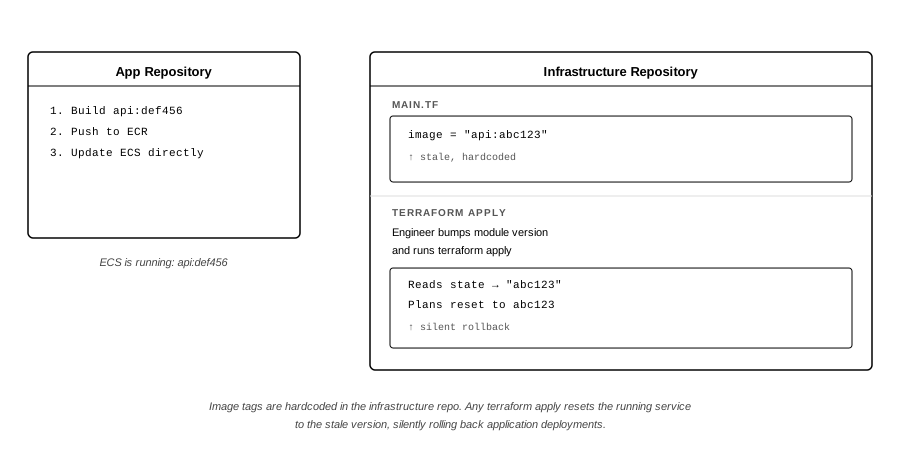
The core problem is that the image tags are hardcoded in infrastructure code. Subsequent application deployments make them stale. Any infrastructure apply carries the risk of silently rolling back application deployments to an outdated version.
The problem looks like this:
After: One Source of Truth
The fix is to make Terraform read the live deployed version instead of storing a hardcoded one.
AWS Systems Manager Parameter Store serves as the bridge. The application CI writes the deployed version to an SSM parameter immediately after each successful deployment. The version is the container image SHA for ECS services or the S3 object key for Lambda packages. The infrastructure code reads those parameters at apply time using a small Terraform module called the version registry. The hardcoded version is replaced with a live lookup.
The SSM Registry Pattern treats Parameter Store as the single source of truth for deployed application versions, making Terraform a consumer of that truth rather than a holder of a stale copy.
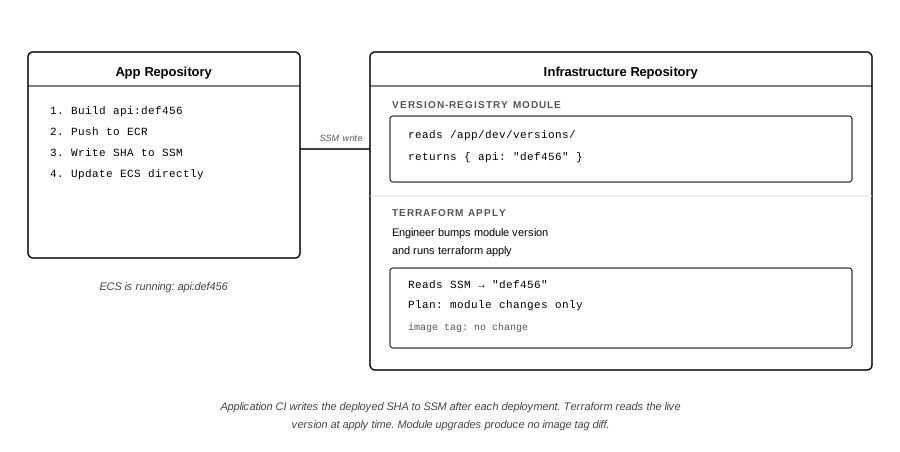
When an infrastructure engineer bumps a module version and runs terraform apply, the version registry module reads the current SHA from SSM. The plan reflects the live deployed state. The modifications that are part of the module upgrade show up as changes, but the image tag does not.
The solution looks like this:
The Version Registry Module
The code samples in the following sections come from a companion repository with a full working implementation. The version registry module is small by design. Its only job is to read all SSM parameters under a given path prefix and return them as a map via a Terraform output:
# infra/modules/version-registry/main.tf

variable "ssm_path" {
  description = "SSM path prefix to read versions from, e.g. /app/dev/versions/"
  type        = string
}

data "aws_ssm_parameters_by_path" "versions" {
  path = var.ssm_path
}

output "version_map" {
  description = "Map of service name to deployed version"
  value = {
    for i in range(length(data.aws_ssm_parameters_by_path.versions.names)) :
    basename(data.aws_ssm_parameters_by_path.versions.names[i]) =>
    data.aws_ssm_parameters_by_path.versions.values[i]
  }
}
aws_ssm_parameters_by_path reads every parameter under the given prefix in a single API call. The data source is non-recursive, so service names must live directly under the path prefix. If you nest them, set recursive = true or they will be silently excluded.
The for expression maps each parameter’s trailing path segment, the service name, to its value. A new service appears in the map automatically when it writes its first version to SSM. There is no list of service names to maintain.
Wiring the Module Into the Infrastructure
The companion repository uses a single Terraform root at infra/main.tf for all infrastructure. The version registry module call goes at the top, before any resources that need a version reference.
module "version_registry" {
  source   = "./modules/version-registry"
  ssm_path = "/app/${var.environment}/versions/"
}

locals {
  api_version = lookup(module.version_registry.version_map, "api", "SEED_REQUIRED")
  processor_version = lookup(module.version_registry.version_map, "processor", "SEED_REQUIRED")
}
The lookup function provides a fallback for the initial setup, before the application CI has written anything to SSM. The SEED_REQUIRED sentinel makes the unsatisfied state obvious. Resources that depend on these locals will fail at apply time with an AWS error pointing at the missing version. The companion repo’s README walks through the full bootstrap sequence, including pushing an initial image to ECR, writing the first SSM parameters, and running the first apply.
The ECS task definition replaces its hardcoded image tag with the local:
resource "aws_ecs_task_definition" "api" {
  # ...
  container_definitions = jsonencode([{
    name  = "api"
    image = "${aws_ecr_repository.api.repository_url}:${local.api_version}"
    # ...
  }])
}
The Lambda module uses the same pattern for its S3 deployment package key:
module "processor" {
  source  = "terraform-aws-modules/lambda/aws"
  version = "7.4.0"
  # ...
  s3_existing_package = {
    bucket = module.lambda_packages_bucket.s3_bucket_id
    key    = local.processor_version
  }
}
In both cases, the version comes from SSM at apply time. If the application CI deployed api:def456 ten minutes ago and wrote that SHA to SSM, the next terraform apply will compute the task definition with api:def456 and leave the latest deployed version untouched.
Pinned Module Versions and Why They Matter Here
The sample repository pins the ECS cluster module and the Lambda module to specific versions from the Terraform Registry rather than using raw aws_ecs_* resources, specifically to preserve the module-upgrade scenario as a realistic trigger for version drift.
module "ecs_cluster" {
  source  = "terraform-aws-modules/ecs/aws"
  version = "5.11.4"
  # ...
}

module "processor" {
  source  = "terraform-aws-modules/lambda/aws"
  version = "7.4.0"
  # ...
}
This is not incidental. In a production infrastructure repository, module versions are upgraded on a deliberate schedule to pick up security fixes, new features, or provider compatibility updates. Those upgrades are a routine trigger for terraform apply. Without the SSM registry in place, they also carry the risk of silently resetting application versions.
With the registry, a module version bump generates a plan showing only the module changes. The application versions are read live from SSM, match what is running, and produce no diff. That is the before and after in practice.
Extending to Multiple Environments
This sample uses a single environment. In production, the pattern extends cleanly across as many AWS accounts or environments as you need by scoping the SSM path per environment.
Promoting a version from dev to staging is a deliberate act. You write the validated SHA to the staging SSM path and let the staging infrastructure pipeline pick it up on its next apply. It is not an automatic consequence of a push. That deliberate gate is the right model for environment promotion, and the SSM path scoping enforces it naturally.
What’s Next
Part 1 covered the infrastructure side of the pattern. The version registry module reads deployed versions from SSM at apply time. Infrastructure resources reference those live values instead of hardcoded versions. Module upgrades, configuration changes, and routine infrastructure applies can no longer reset a running application to an old version.
Part 2 covers the other side. It walks through the GitHub Actions workflows that write to SSM on every application deployment, how the infrastructure pipeline pre-refreshes the version registry before running, and the operational details that matter in practice. That includes state management, what the plan output looks like on first apply, and how rollback works when you need it.
The full working sample, verified against a live AWS environment, is at github.com/sms-data-products/blog-terraform-ssm-version-registry.
About the Authors
Christopher Jones is a Senior Software Engineer at Gridline specializing in resilient, high-performance back-end systems for the financial industry. Since transitioning into software engineering in 2020, he has focused on building reliable, scalable software and infrastructure for mission-critical environments. He developed deep expertise in Infrastructure as Code by creating engineering patterns that improve operational reliability, consistency, and long-term maintainability.
Rob Stewart has over 25 years of experience driving technology innovation. As a cloud architect at SMS, he spearheads the design and implementation of cutting-edge cloud solutions for government and private sector customers, unlocking efficiency and scalability. Prior to SMS, Rob led a global team developing a learning management platform deployed on AWS and was instrumental in driving the adoption of modern devops practices resulting in a dramatic increase in the consistency of software delivery. He is an accredited expert in cloud technologies, with multiple AWS, Azure and Kubernetes certifications. In his free time, he enjoys spending time with his family and two cats.
Disclaimer: The code samples and architecture described in this post are drawn from a public sample repository at github.com/sms-data-products/blog-terraform-ssm-version-registry, built to illustrate the pattern. They do not represent Gridline‘s actual production configuration.
